Schedule Posts to Facebook, Instagram and LinkedIn Weeks Ahead
Plan your social media calendar in one week view, with your drafts beside it. Drag a post onto a day and it is set for noon, or open Schedule to take the suggested posting time or pick your own. Schedule up to 90 days ahead.
How Scheduling Works
A Week View With Your Drafts
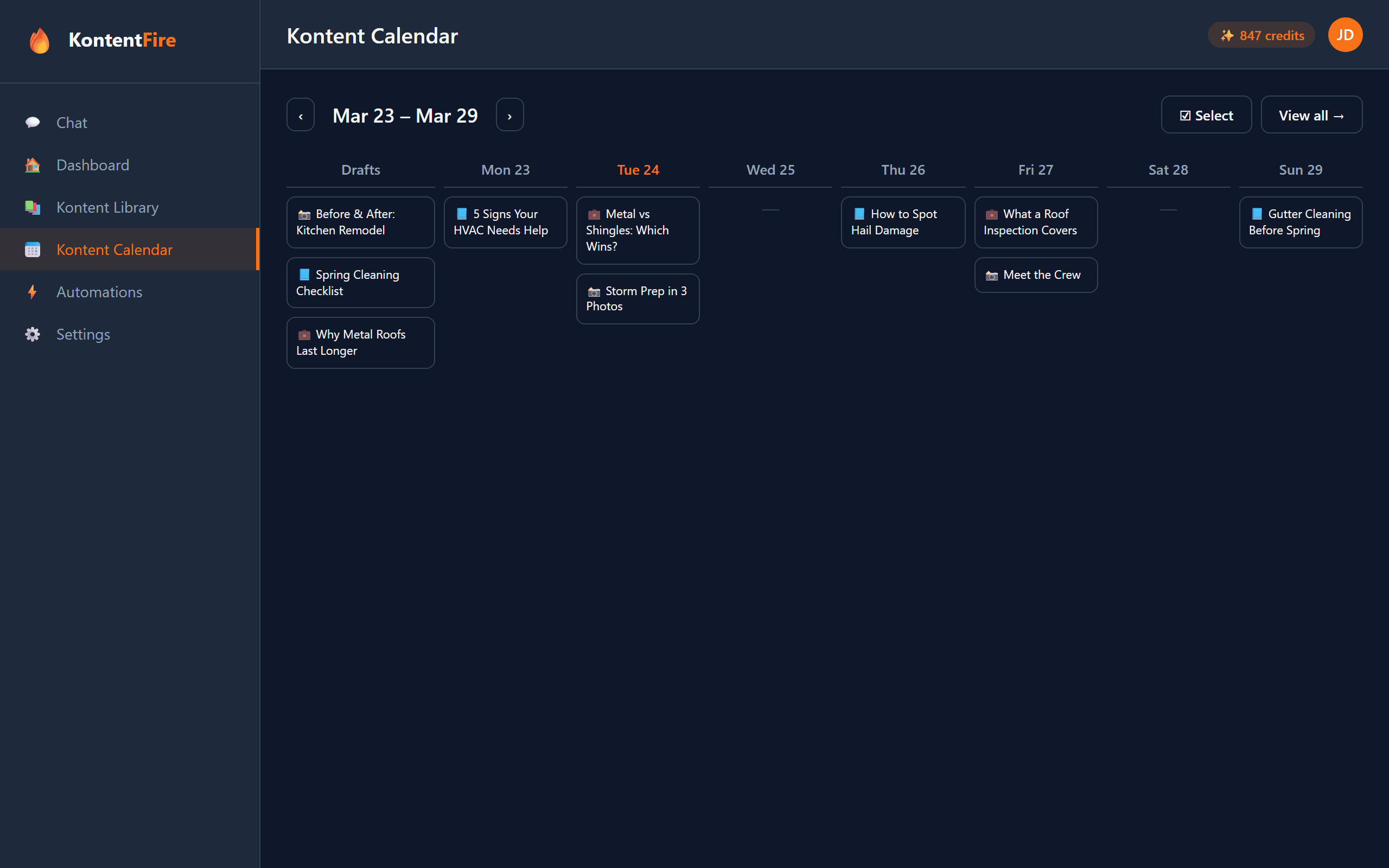
See Monday to Sunday with each day's scheduled posts, and a Drafts column beside the week for posts that have no date yet.
Drag to Schedule
Drag a draft onto a day to schedule it for noon, drag a post to another day to move it, or drag it back to Drafts to take it off the schedule.
A Suggested Time per Network
KontentFire suggests a posting time for each network, the time posts there usually get the most attention, based on platform research. Open the Schedule window to keep it or pick your own.
Up to 90 Days Ahead
Schedule a post for any date up to 90 days from today, so a season's posts can be set before it starts.
A Version for Each Network
Check the networks a post is for and KontentFire writes a separate version for each of Facebook, Instagram and LinkedIn.
Three Networks in One Place
Connect your Facebook Page, Instagram account and LinkedIn: one on the Free plan, all three on Spark or Blaze.
Why Plan Ahead
Common Questions
How far in advance can I schedule posts?
Up to 90 days. That covers most seasonal pushes, such as spring cleanups or furnace checks before winter.
Which networks can I schedule to?
Facebook (a Page), Instagram and LinkedIn. The Free plan connects one of them, and Spark and Blaze connect all three.
Can I schedule the same post to more than one network?
Yes. Pick the networks you want and KontentFire writes a separate version for each of Facebook, Instagram and LinkedIn, adapted to that network's length, hashtags and style.
Does KontentFire suggest posting times?
Yes. When you schedule a post it shows the time posts on that network usually get the most attention, based on platform research. Use it, or set your own time.
How do I move a post after scheduling it?
Drag it to another day in the week view, or back to the Drafts column to take it off the schedule.
How do I connect my accounts?
Press Connect for each network, sign in to Facebook, Instagram or LinkedIn there, and allow KontentFire to post. KontentFire never sees your password, and you can disconnect at any time.
Related Features
Need ideas for what to post? Read our guides to what to post on Facebook, Instagram marketing and LinkedIn marketing.
Ready to Plan Your Week?
Start on the Free plan and schedule your first post in a few minutes.